Connecting from ChatGPT
Inside ChatGPT, the Brikly Connector shows up as an App. The setup is similar to Claude: connect once, then ask questions in any new chat.
What you will need
- A Brikly account with CostingBrik active.
- A ChatGPT account on the Plus, Pro, Team, or Enterprise plan (Apps are not available on the free tier).
- Five minutes.
Step 1: Enable Developer Mode
Brikly is a custom MCP server, so before you can add it you need to enable Developer Mode in ChatGPT. This is a one-time setup.
- Sign in to chatgpt.com.
- Open Settings (bottom-left menu) and go to Apps.
- Click Advanced Settings.
- Toggle Developer mode on.
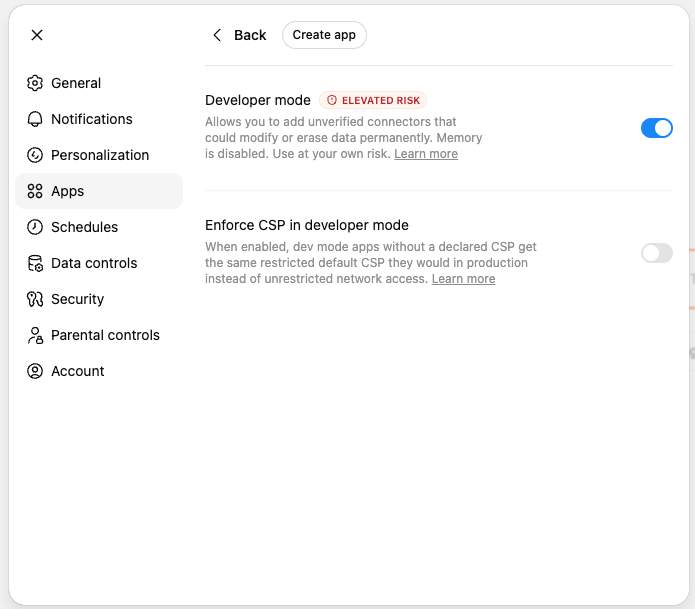
ChatGPT flags Developer mode as elevated risk because custom MCP servers in general can be written to read or modify your data. Brikly's Connector is read-only and OAuth-scoped to your own tenant - it cannot make any changes to your account, and it cannot see other operators' data. The warning is generic to the feature, not specific to Brikly.
Leave Enforce CSP in developer mode off unless you know you need it.
Step 2: Add Brikly as a custom App
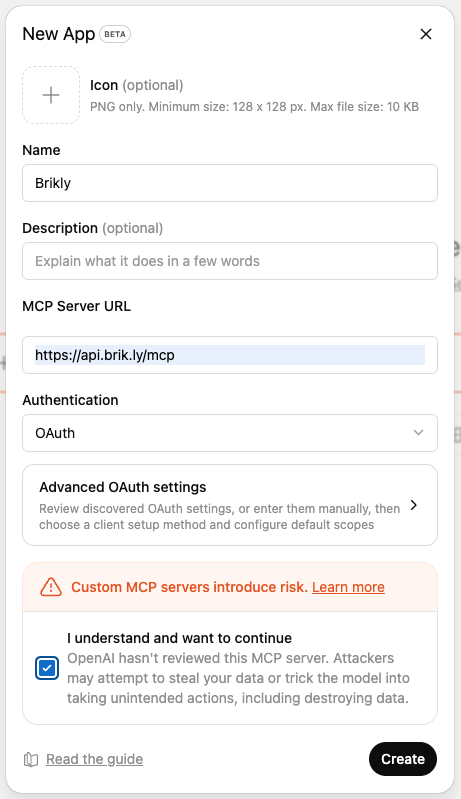
- Still in Settings → Apps, click Create app (top-right).
- Fill in the form:
- Name:
Brikly - Description: optional, e.g. "Recipe costing and margin analysis"
- MCP Server URL:
https://api.brik.ly/mcp - Authentication:
OAuth
- Name:
- Tick I understand and want to continue under the risk warning.
- Click Create.
ChatGPT will redirect you to Brikly to sign in. Use the same email and password as the Brikly web app, then approve the access request. You will be redirected back to ChatGPT and the Brikly App now appears in your Apps list.
Step 3: Try it in a chat
In a new conversation, mention "Brikly" or ask a recipe / margin question. ChatGPT will offer to use the App. Approve the first call - after that it can keep using the connection during the chat.
"Using my Brikly app, list my five worst-margin products."
If ChatGPT pulls a list grounded in your actual recipes (not generic suggestions), the App is working.
Disconnecting
Settings → Apps & Connectors → Brikly → Disconnect (or Remove).
ChatGPT loses access immediately. Tool responses already visible in past chats stay visible, but nothing new can be queried.
What ChatGPT can see
ChatGPT receives the same server-level briefing as Claude when it connects, covering:
- What Brikly is and who uses it.
- That the App is read-only.
- Currency and units conventions (your tenant's base currency, prices stored per gram or millilitre and displayed in kg or litres).
- That margins like
0.74mean 74% gross margin, not 74% cost ratio. - The vocabulary it needs to interpret your data correctly.
If ChatGPT keeps asking "what is your business" or quotes prices in dollars when you trade in pounds, the briefing has not loaded properly. Try disconnecting and reconnecting.