Brikly Connector
The Brikly Connector lets you ask AI assistants like ChatGPT and Claude questions about your own Brikly data, in plain English, without leaving the chat window.
If you have ever wanted to ask "what is my margin on a flat white?" or "if Whole Milk goes up 10%, which drinks does it hurt most?" and get an answer based on your actual recipes and supplier prices, the Connector is what makes that possible.
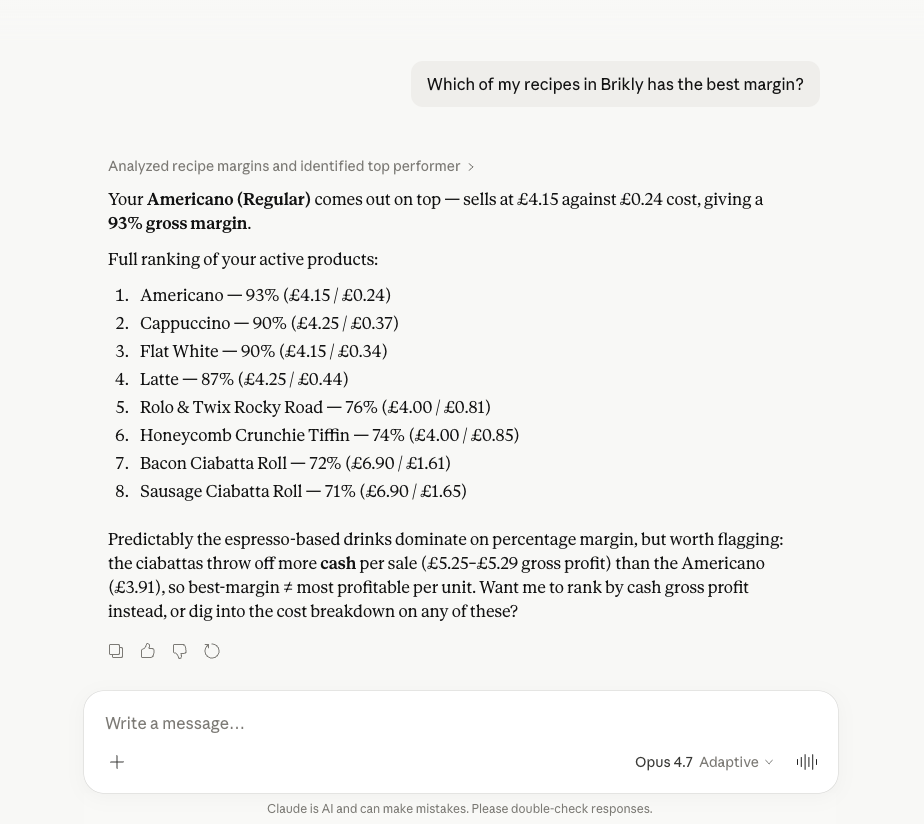
Inside Claude (and Claude Desktop) it shows up as a Connector. Inside ChatGPT it shows up as an App. Both names refer to the same thing - a secure link from the AI assistant into your Brikly account, read-only by default with two narrowly scoped writes: saving and deleting what-if scenarios, and proposing recipe changes as drafts for you to review in the web app.
Who it is for
The Connector is built for hands-on, time-poor operators who already use ChatGPT or Claude for everyday work and want margin-aware answers grounded in their own data, not generic hospitality advice.
You do not need to know any technical jargon to use it. If you can paste a link and click "Connect", you can use the Connector.
What you can do with it today
Once connected, you can ask questions like:
- "What is my margin on a Latte?" - the assistant looks up your Latte recipe, pulls the live ingredient and consumable costs, and quotes the gross margin.
- "Show me my five worst-margin products." - the assistant lists your products, sorts by margin, and highlights the bottom five.
- "Which recipes use Whole Milk?" - the assistant uses the reverse lookup to find every recipe that uses Whole Milk and shows the per-portion cost contribution.
- "If Whole Milk goes up 10%, what does that do to my annual profit?" - the assistant runs a what-if simulation across every affected recipe, weights the result by POS sales, and quotes the annualised impact plus the top-impacted drinks.
- "What if I swapped dairy milk for oat milk on lattes and cappuccinos?" - the assistant simulates the swap with per-recipe quantity adjustments and shows you the new margins.
- "Tell me about my coffee bean costs." - the assistant pulls the supplier list and recent price history for any matching ingredient.
- "I'm meeting my syrup supplier's rep on Tuesday - what should I know?" - the assistant pulls the supplier's negotiation brief: what you bought over the last 12 months in real-world units, what it cost ex VAT, how their prices have moved, and where you already have cheaper alternatives on file.
- "What does my menu cost across the Brighton site?" - the assistant filters by location and ranks the menu.
- "What is costing me money on the menu right now?" - the assistant reads Brikly's weekly MenuBrik snapshot and lists the items it has flagged, with the money at stake, in the same words the web app shows on Home.
- "Which items are priced thin, and what does Brikly suggest I charge?" - the assistant lists the items whose menu price sits under the target gross profit for their menu group, and can pull up any one of them with Brikly's own suggested price and the target it solves for.
- "How did yesterday go?" - the assistant quotes the last complete trading day: takings, transactions, average order value and items per order against a like-for-like baseline, plus the busiest hour.
- "Has the Bidfood invoice from last Tuesday landed yet?" - the assistant lists recent invoices, filtered by supplier and date, and tells you which ones still need review.
The Connector knows about your recipes, ingredients, suppliers, prices, and margins inside CostingBrik, what your till actually sold through MenuBrik, plus your recent invoices and their processing status, for the account you sign in with. Cross-tenant access is impossible - you only ever see your own data.
Current scope
The Connector exposes CostingBrik in full, MenuBrik's performance reads, and a slim invoice read surface:
- Recipes - products, components, modifiers, variations, full ingredient breakdown, per-portion and batch cost, gross margin (VAT-correct). Every cost and margin carries a completeness flag: when a line could not be priced the assistant is told the cost is a floor and the margin overstated, rather than being left to quote either as final. A complete flag means no line on that recipe failed to price. It does not follow a sub-recipe down to confirm the component's own cost is settled, so ask about the component too if that matters.
- Ingredients and suppliers - active suppliers, preferred prices, recent price history, the same "cheaper supplier available" hint the web app uses, and an operational role tag (milk, alt-milk, syrup, coffee bean, and so on) so the assistant can match fuzzy categories like "what milks am I using" even when alt-milk product names do not contain the word. The supplier list includes expense suppliers (utilities, services, equipment, premises and other bills) as well as goods suppliers, with the expense ones tagged, so the assistant can name them without mistaking your energy company for a food supplier. It has no spend analysis for expense suppliers, but it can list their bills if you ask for expense invoices by name.
- Supplier negotiation brief - the same per-supplier purchase statement as the web app's negotiation brief: 12 months of purchases in the pack sizes you actually buy, ex-VAT spend with credit notes netted, confirmed price-change history, and your private leverage (cheaper alternatives already on your books). Goods suppliers only, as in the web app; ask for a brief on an expense supplier and the assistant is told there is nothing to negotiate. The printable PDF stays in the web app.
- Locations - filter answers to a single site or compare sites.
- Reverse lookup - "if this ingredient changes, what is affected" - find every recipe that uses an ingredient or sub-recipe, with the quantity each one uses.
- What-if simulator - model a supplier price change, ingredient swap (with per-recipe quantity overrides), menu price bump, VAT band change, batch yield change, or sub-recipe quantity change, and see the annualised profit impact across the affected recipes. Results are sales-weighted using a rolling 52-week POS average where available, with a fall-back to your manually entered weekly sales estimate. Recipes with no sales data on either side are surfaced separately so they do not skew the headline.
- Saved scenarios - run, save, list, get, and delete what-if scenarios. Scenarios that have already been pushed live in the web app are returned read-only.
- Recipe drafts - propose recipe edits, brand-new recipes, or duplicates as drafts that land in your Recipe Drafts Inbox. The assistant can also cost a hypothetical spec without persisting it, list pending drafts, get a single draft, and discard a pending draft it proposed by mistake. Approving and rejecting drafts always happens in the Brikly web app. See Proposing recipe changes from chat.
- Price-change triage - two sides of the same coin. Ask "what's been hitting my margins lately?" for confirmed price-change history (net annual impact, top recipes hit), or "what's waiting for me to review?" for the outstanding queue - the same flagged price changes the web app's Price Change Review wizard steps through, each with its estimated annual profit impact pre-computed, sorted biggest first. Confirming or rejecting a review still happens in the web app.
- Menu performance (MenuBrik) - what the till actually sold, rather than what a recipe should earn. Three reads. What needs attention right now comes from Brikly's weekly MenuBrik snapshot, the same one behind the web app's Home panel and the Monday alert, so that answer and your screen say the same thing. The same read also covers what moved since the week before, and the week-by-week health score series, which is Connector-only: Brikly stores a score with every weekly snapshot but no screen charts them. Per-item performance covers what each menu item sold and earned over the last 7, 30 or 90 days - quantities, takings, cost, margin and the flags Brikly raised on it (priced thin, price leak, modifier leak, and quiet sellers worth a review) - filtered by name, flag, category or site, or pulled up one item at a time. Sales shape covers the last complete trading day against a like-for-like baseline, the five trading bands, till categories against the previous equal period, and which modifier sets pay for themselves. It needs a MenuBrik subscription (an add-on to CostingBrik) and a connected POS; without both, the assistant is told which one is missing and what to do about it, and nothing else stops working. These reads are read-only like the rest: acknowledging a flag, setting a margin target and moving a category stay in the Brikly web app, and a price changes on the till, not in Brikly.
- Invoices - list recent invoices with supplier and date filters, and check the header of any one invoice (totals, VAT, status, how many lines are matched, how many still need your review). Ingredient and consumable invoices come back by default; bills classified as expense invoices (utility, service, equipment, premises, other) are included only when you ask for them, and are labelled with their category so the assistant does not mistake a skipped energy bill for a food invoice with unmatched lines. Because the assistant can check an invoice number, date and total, an automation can ask "is this bill already in Brikly?" before uploading it. Individual line items, extracted units, and per-line confidence scores are deliberately not exposed - those are pre-review and the operator reconciles them in the Brikly web app. Uploading invoices through the Connector is not supported - use the web upload, Chrome extension, Invoice Inbox, or Quick Capture instead.
Other Briks (SafetyBrik, StaffBrik) are not yet exposed through the Connector. If you ask the AI assistant about food safety records, staff rotas, or payroll, it will tell you to go to the Brikly web app instead.
We plan to expand Connector coverage as each Brik matures.
OAuth scopes
The Connector uses two OAuth scopes - your AI assistant is granted one or both when you connect:
costing.read- default for read-only use. Covers every read tool (recipes, ingredients, suppliers, what-if simulation, reading scenarios and drafts, invoice list / get, and menu performance from your till: per-item quantities, revenue and margin flags).costing.write- adds the two write tools and every action on them: saving and deleting what-if scenarios, and proposing, revising, discarding, and pending-ingredient linking on recipe drafts. Also satisfies the read baseline so the same token can still read.
If your assistant tries to call a tool the current token does not cover, the Connector refuses the call with a standard OAuth scope challenge that names the missing scope (costing.write). Assistants that support step-up authorisation will offer to reconnect with write access on the spot; others show a "this tool requires costing.write" or "insufficient scope" message. Either way, the scope is lifted from the assistant's side, not from Brikly: reconnect Brikly in your assistant's connector settings so it asks for costing.write. The Brikly app cannot widen a grant that has already been issued - Settings → Connections lists your connections and lets you revoke one, which you only need to do if your assistant will not re-ask for permissions on its own.
Each connection is also limited to 60 tool calls a minute, which is well above anything a normal conversation does. If an assistant runs into that ceiling it is told to wait a minute; see Troubleshooting.
What it cannot do
Almost everything the Connector exposes is read-only or sandboxed. The two writes - what-if scenario save / delete and recipe draft propose / discard / link - are both deliberately limited. The Connector cannot:
- Edit live recipes, prices, or suppliers. Those actions live in the Brikly web app. The closest the assistant can get is proposing a recipe draft, which you then approve in the Recipe Drafts Inbox.
- Approve or reject a recipe draft. Approval is operator-only, web-app-only. If the assistant ever offers to apply a draft for you, treat it as a hallucination.
- Push a what-if scenario to live prices. The simulator only tells you what would happen. Applying the change to live recipes (the "Push" step) is a deliberate confirmation step in the What-If page of the Brikly web app, never from chat.
- Recommend specific price moves on its own. The assistant has been told to surface impact and let you decide. If it offers a confident "raise the latte by 30p" without you supplying competitor or footfall context, treat it as a suggestion, not a recipe. The one price it may quote is Brikly's own suggested price on a priced-thin item, which is Brikly's arithmetic against your target, not the assistant's judgement.
- Upload invoices. Use the web upload, Chrome extension, Invoice Inbox, or Quick Capture instead - they handle larger files reliably and bypass the assistant's tool-argument size limits.
- Edit invoice line items, approve matches, or confirm price changes. Line-item review is a deliberate human step in the Brikly web app. The assistant can tell you how many lines are waiting; it cannot resolve them.
- Quote individual invoice line items. The Connector deliberately omits raw line items from its responses because they are written by the AI extraction before any human review and may have wrong units or pack sizes. Line-level questions belong in the Brikly web app.
- Show individual POS transactions, till receipts, or customer data. Per-item till figures are readable now that MenuBrik is exposed - what each menu item sold, what it took and the margin on it, plus takings by trading band and margin by till category - and the simulator still reads the rolling weekly POS average to weight results. Individual transactions, their line items and anything about a customer are not exposed at all.
- Show food safety logs, staff hours, rotas, or payroll. Those Briks are not connected yet. The only labour figure the Connector carries is the recipe's own - the minutes and the cost per portion a recipe records, which a single-item menu read repeats beside the till figures - and that is never a wage bill.
- See any data outside your tenant. Cross-tenant access is impossible.
If the assistant ever offers to make a write-style change to live data for you, that is a hallucination - please ignore it and let us know.
Privacy and access
- The Connector uses OAuth 2.0 to authenticate against your Brikly account. The AI assistant never sees your password.
- Only data inside your own tenant is exposed - the Connector cannot see other operators' data.
- You can disconnect the Connector at any time from inside ChatGPT or Claude. Once disconnected, the AI assistant immediately loses access.
- Brikly logs every Connector tool call so you have a record of what was queried and when.
Next steps
- Connecting from Claude - step-by-step setup for Claude.ai and Claude Desktop.
- Connecting from ChatGPT - step-by-step setup for ChatGPT.
- Example questions to try - prompts that work well, and how to phrase them.
- Proposing recipe changes from chat - how to ask the assistant to draft recipe edits, new recipes, and duplicates.
- Troubleshooting - what to do if it stops working.